CRM vs ERP: What’s the Difference and Which Does Your Business Need?

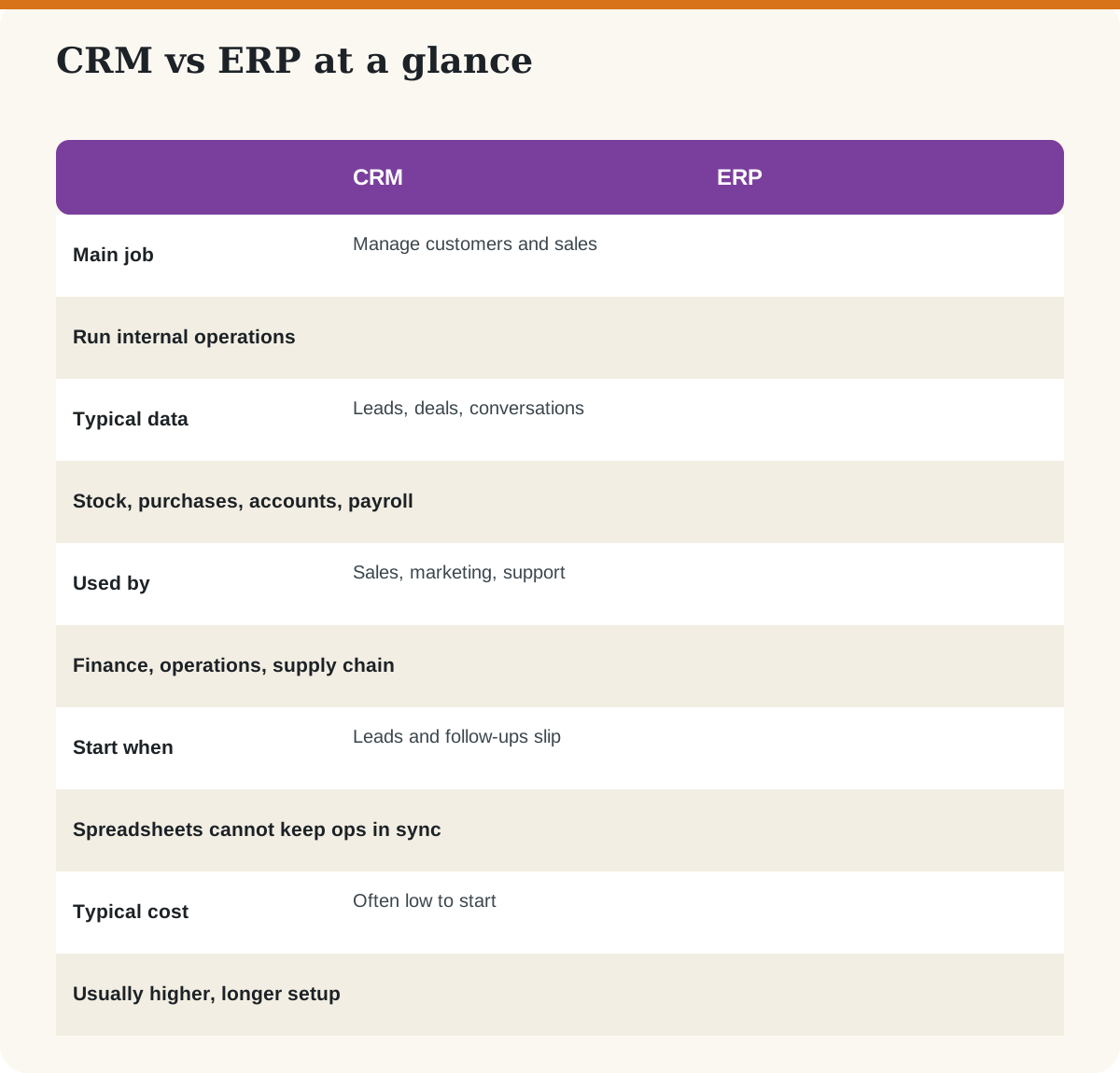
The two terms are often confused because both are “business software” that store data. The difference is the question each one answers. A CRM answers “who are my customers and what is happening with each deal?” An ERP answers “what do we have, what do we owe and what do we need to make or buy?” This guide explains both, shows how they connect, and helps you decide what to buy first.
Key takeaways
- CRM is customer-facing; ERP is operations-facing.
- You do not have to buy both. Many firms connect a CRM to accounting software first.
- Choose by the problem you have today, not the biggest system on offer.
- Integration matters: customers, orders and invoices should not be typed twice.
What is the main difference between CRM and ERP?
How do CRM and ERP work together?
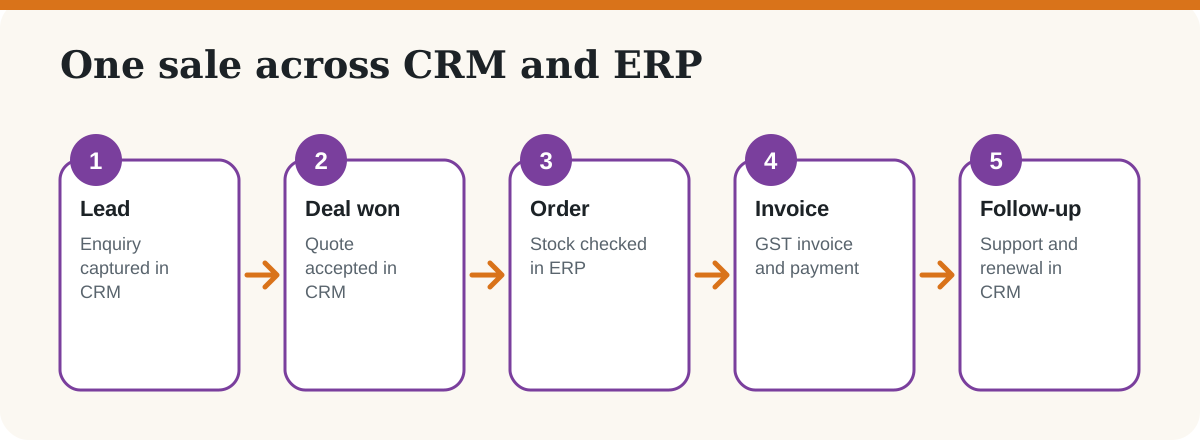
Think of one sale. The CRM tracks the lead and the quotation. When the deal is won, the order moves to the ERP or accounting system, which checks stock, raises the GST invoice and records payment. The CRM then keeps the support and renewal conversations going. When these systems are connected, nobody retypes the customer’s details.
Which should a small business buy first?
| Your situation | Start with |
|---|---|
| Leads and follow-ups get lost | A CRM. See the best free CRMs for India. |
| Invoices and GST filing take too long | Accounting software. See GST-ready accounting software. |
| Stock, purchases and production are out of sync | An ERP or inventory system |
| Many projects and tasks | A project management tool |
| Hiring and payroll growing | An HRMS |
What mistakes should you avoid?
- Buying an ERP because it sounds professional, then using 10% of it.
- Skipping staff training. Software fails more from adoption than features.
- Ignoring data quality. Clean your contact and item lists first.
- Not asking how data moves between tools.
Ready to roll out a CRM? Use our 30-day implementation plan.
Frequently asked questions
What is the difference between CRM and ERP?
CRM manages customer relationships, leads and sales. ERP manages internal resources such as inventory, finance, purchasing and payroll.
Do I need both CRM and ERP?
Not at the start. Many small businesses use a CRM plus accounting software. As operations grow, an ERP can tie finance, stock and purchasing together.
Can a CRM replace accounting software?
No. A CRM tracks customer relationships. You still need accounting software for books, GST filing and financial statements.
Is an ERP too expensive for small businesses?
Full ERP systems often cost more and take longer to set up than a CRM. Lighter inventory and accounting tools may be enough until your operations are more complex.
Can CRM and ERP be connected?
Yes. Many products offer built-in connections, integrations through third-party tools or APIs. Ask vendors how customer, order and invoice data syncs.
Which comes first, CRM or ERP?
Start with the one that fixes your biggest pain. Lost leads point to a CRM; messy stock and accounts point to ERP or accounting software.
Last checked: October 2026. This is a general explainer; features and prices differ by product.