Best Free CRM for Small Businesses in India: How to Choose (2026)

A CRM (customer relationship management) tool keeps your leads, customers, follow-ups and deals in one place instead of scattered across WhatsApp, diaries and spreadsheets. Free plans are a low-risk way to start. This guide explains what free usually includes, compares two widely used options using their published limits, and gives you a checklist for choosing. If you are still deciding whether you need one, read CRM vs ERP first.
Key takeaways
- Free CRMs limit users, contacts, emails or features. Check the limits that matter to you.
- Under about 50 active customers, a well-kept spreadsheet can still be enough.
- Test with real leads for a week before moving everyone.
- Make sure you can export your data so you are never locked in.
What is the difference between Zoho CRM free and HubSpot free CRM?
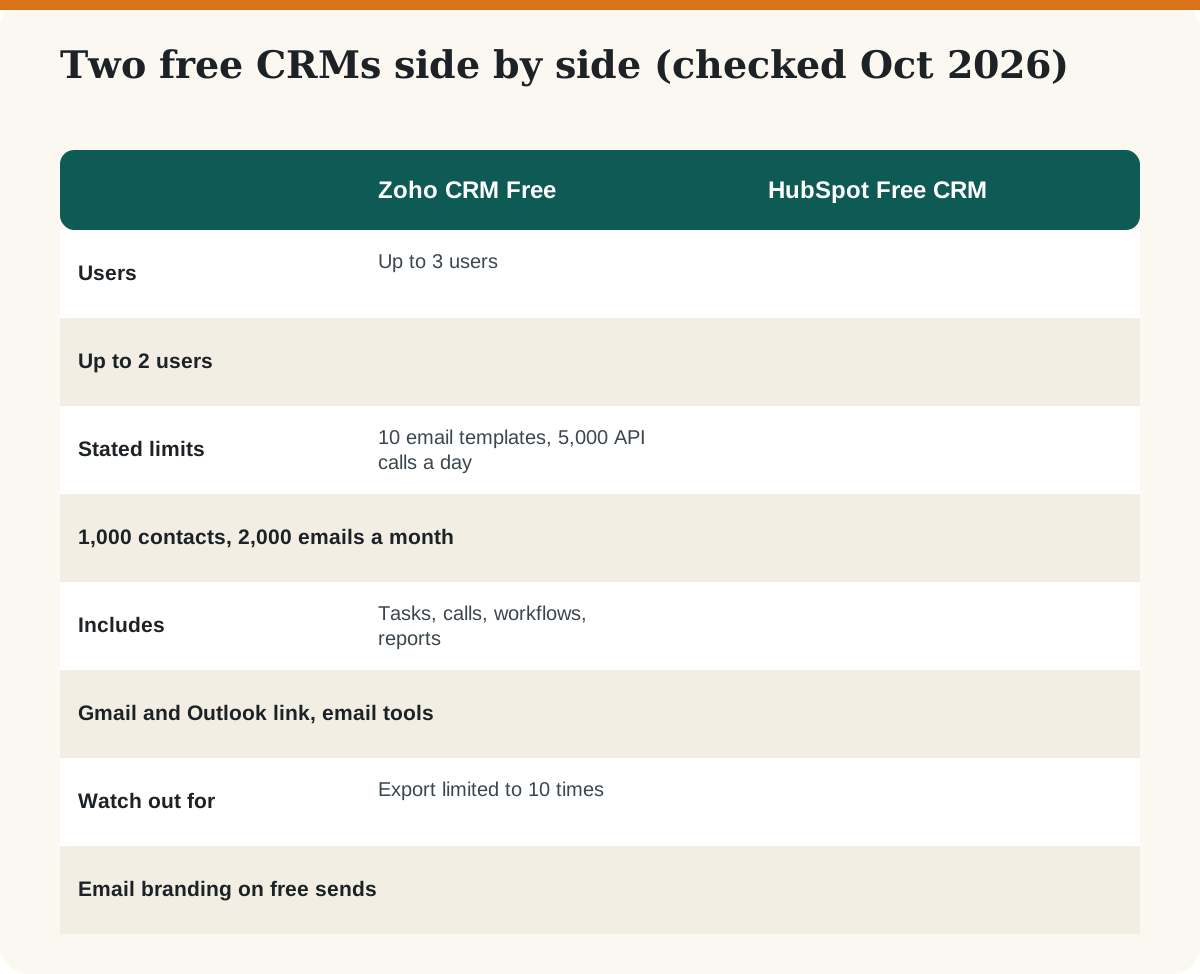
Zoho CRM’s free edition is described on Zoho’s pricing page as forever free for 3 users, with contact management, follow-up reminders, workflow automation, task, meeting and call tracking, spreadsheet imports, standard reports and mobile apps. It lists up to 10 custom email templates, up to 10 free data exports and 5,000 API calls per day.
HubSpot’s free CRM is described as free for up to 2 users with 1,000 contacts and no time limit, with lite versions of select paid tools. Email marketing is limited to 2,000 sends per calendar month with HubSpot branding, and it connects with Gmail and Outlook.
Other CRMs also offer free or low-cost starter plans. Check the plans of tools such as Freshsales, Bitrix24 or Bigin by Zoho against the checklist below instead of trusting a ranking.
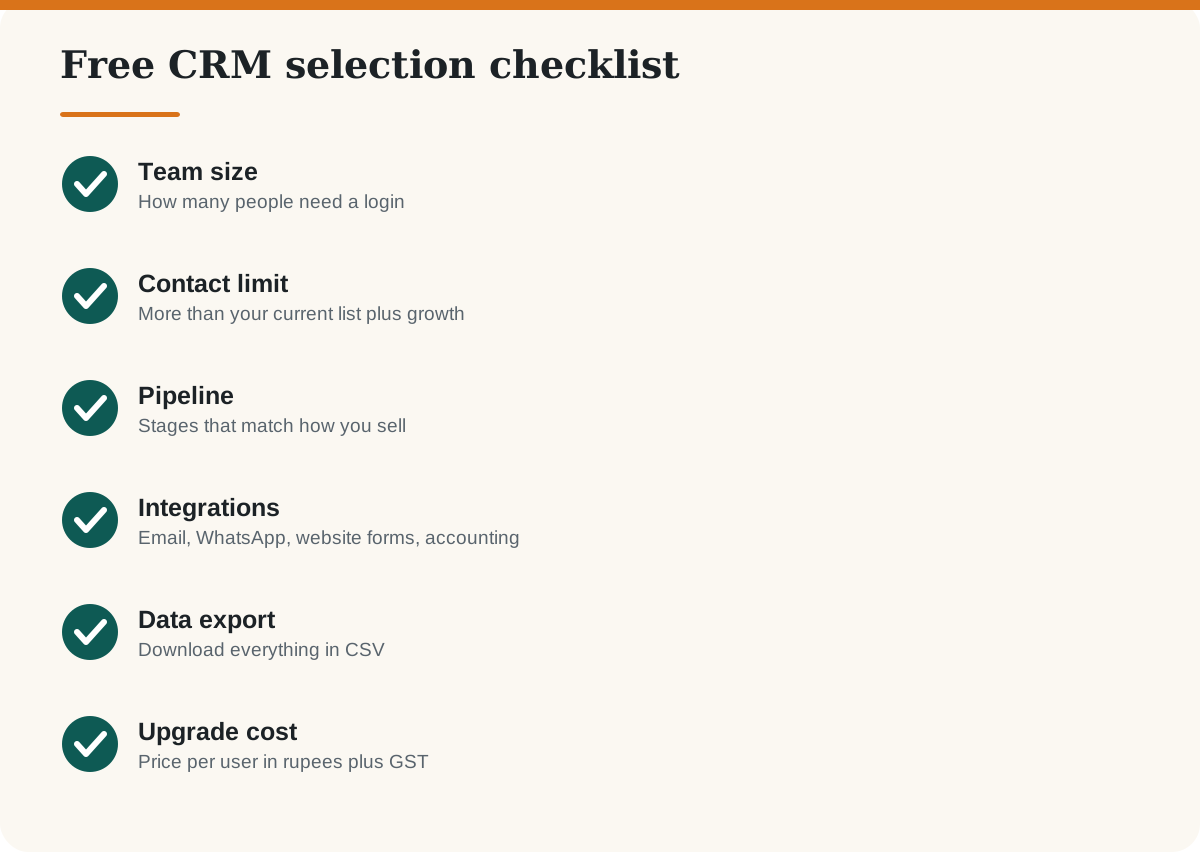
How do you choose a free CRM?
When is a spreadsheet enough?
If you have one or two people selling, fewer than about 50 active customers and a simple process, a Google Sheet with columns for name, phone, source, stage, next follow-up date and notes works. Move to a CRM when follow-ups get missed, when several people touch the same lead, or when you want reminders and reports. Then follow our 30-day CRM setup plan.
What does a CRM do for a small business?
- Stores contacts and every conversation in one place.
- Tracks leads through stages, from enquiry to won or lost.
- Reminds you of follow-ups so no lead is forgotten.
- Shows simple reports: leads by source, deals won, revenue pipeline.
- Can send email campaigns; see email marketing tools for India.
Specialist businesses may need a specialist tool, such as the CRMs in our guide to real estate CRMs. For using AI in customer conversations, see ChatGPT for customer service, marketing and sales.
Frequently asked questions
Which is the best free CRM in India?
There is no single best. Zoho CRM and HubSpot are popular free starting points. Choose by team size, contact limits and the integrations you need.
Is Zoho CRM free?
Zoho lists a free edition for up to 3 users, with limits on templates, exports and API calls. Paid plans unlock more. Check Zoho’s pricing page for current details.
Is HubSpot CRM really free?
HubSpot describes its free CRM as free for up to 2 users with 1,000 contacts and no time limit. Some tools and sends are limited, and paid upgrades cost extra.
Does a small business need a CRM?
Not always. If you have few customers and a simple process, a spreadsheet may do. A CRM helps when follow-ups slip or several people share leads.
Can I move my data later if I switch CRMs?
Usually yes if the tool lets you export contacts and deals as CSV. Check export limits before you enter a lot of data.
Is customer data in a CRM safe?
Use strong passwords, two-step login and limited user access. Collect only the data you need and follow India’s data protection rules. Ask a legal adviser about your obligations.
Sources
Last checked: October 2026. Vendor limits and prices change often. We have no paid relationship with any vendor named here.