How to Write Better AI Prompts: A 5-Part Framework With Examples

Most disappointing AI answers come from short, vague requests, not from a weak tool. “Write about coffee” could mean a poem, a product page or a school essay. This guide shows a simple five-part framework, weak-versus-strong examples, and a way to improve any answer with follow-up messages. It works in ChatGPT, Gemini, Claude and similar assistants. For ready-made templates, see our 25 prompts for small business owners.
Key takeaways
- Be specific about the audience, the goal and the format.
- Give examples of what good looks like, and what to avoid.
- Ask the AI to ask you questions when your brief is incomplete.
- Improve answers with follow-ups instead of starting over.
What is the CRAFT prompt framework?
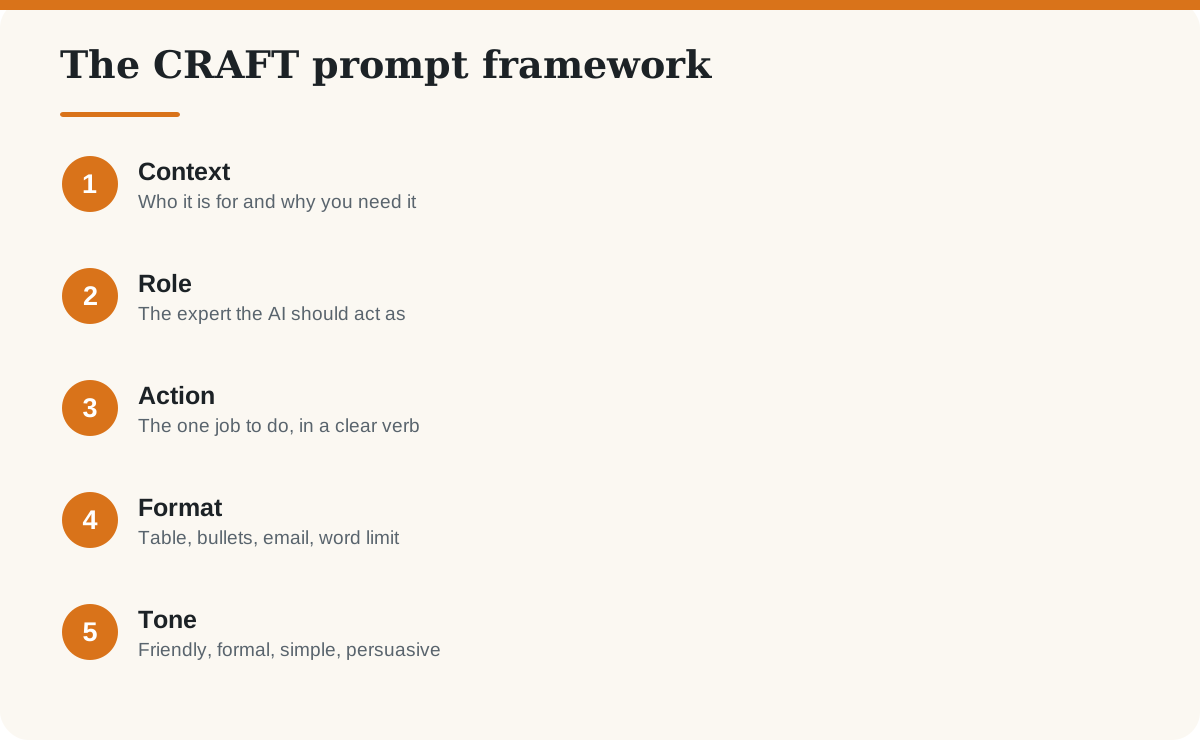
CRAFT is a five-part checklist: Context, Role, Action, Format, Tone. It is our own simple memory aid, not an official standard, but it matches the advice in prompt guides published by AI companies such as OpenAI and Anthropic: be clear and specific, give context, and say what output you want.
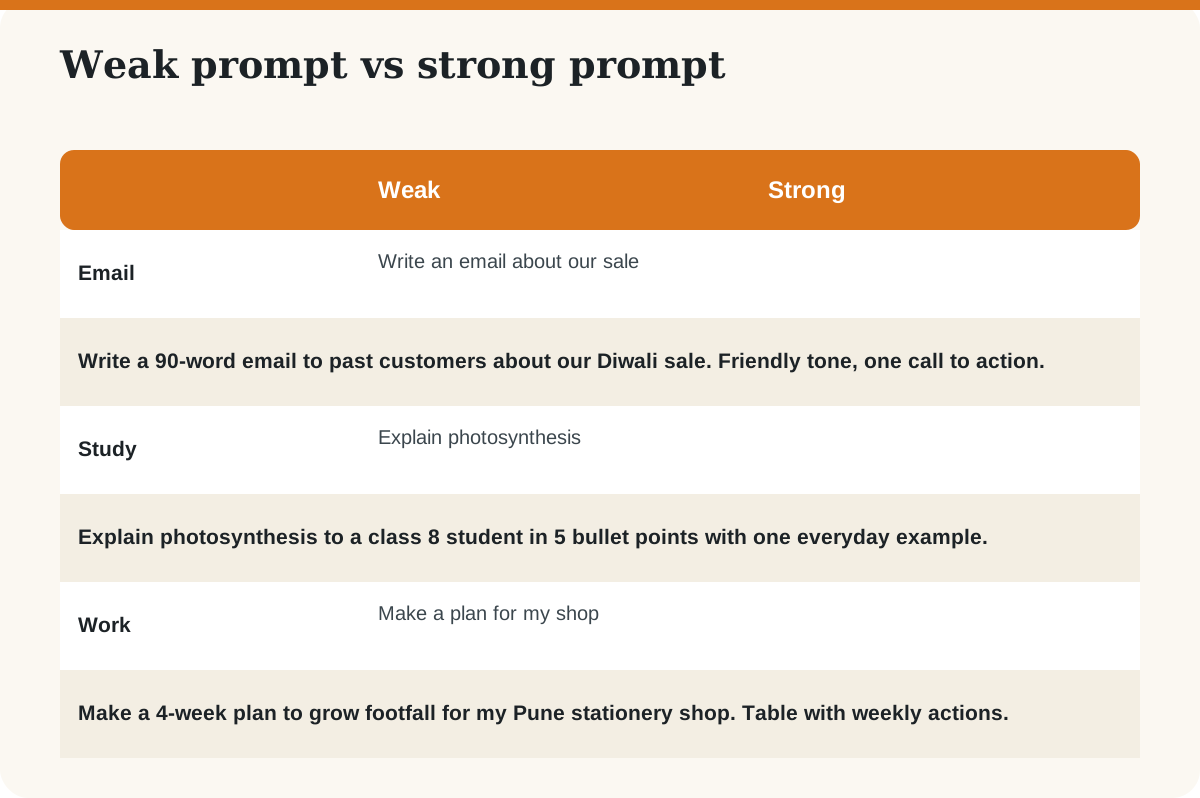
What does a weak prompt look like next to a strong one?
How do you use each part of CRAFT?
C is for Context
Explain the situation: your business, your reader, what you already tried. Example: “I run an online store selling handloom sarees to women aged 30 to 50.”
R is for Role
Name the expert you want: “Act as an experienced copywriter” or “Act as a patient maths tutor”. A role sets vocabulary and depth of the answer.
A is for Action
Use one strong verb: write, summarise, compare, rewrite, list, critique. Avoid stacking five jobs in one prompt. Split big tasks into steps.
F is for Format
Say how the answer should look: “a table with three columns”, “five bullets”, “under 100 words”, or “a numbered checklist”.
T is for Tone
Tell it how to sound: simple, friendly, formal, confident but not pushy. Add words to avoid, such as “no buzzwords”.
What are the best follow-up prompts to improve an answer?
- “Make it shorter and simpler.”
- “Give me three different versions.”
- “What did you assume? List your assumptions.”
- “What is missing or wrong in this answer?”
- “Ask me five questions that would help you do this better.”
- “Rewrite it in the style of this example: [paste].”
What mistakes should you avoid?
- Being too vague. “Make it better” gives the AI nothing to aim at.
- Trusting facts blindly. AI can state wrong facts confidently. Verify them. See our AI-generated content guide.
- Pasting private data. Remove names, phone numbers and confidential details.
- Publishing without editing. Add your own experience, examples and voice.
- Giving up after one try. Prompting is a short conversation, not a single shot.
Want to go further? Our step-by-step guide to learning AI and our article on using AI in WordPress show where prompting fits into real work.
Frequently asked questions
What is a prompt in AI?
A prompt is the instruction or question you give an AI assistant. The clearer and more specific it is, the more useful the answer tends to be.
What makes a good ChatGPT prompt?
A good prompt gives context, defines a role, asks for one clear action, specifies the format and states the tone. Examples and limits such as word count also help.
Do longer prompts always work better?
No. Longer prompts help when the extra detail is relevant. Padding with unnecessary text can confuse the answer. Aim for complete, not long.
Is prompt engineering a real career?
Writing effective prompts is a useful skill in many jobs. As AI tools improve, the skill is shifting towards clear thinking, domain knowledge and checking results, rather than secret phrases.
Do the same prompts work in ChatGPT, Gemini and Claude?
Mostly yes. The CRAFT structure works across assistants, though each tool may respond with a different style, so adjust after testing.
How can I stop AI from making things up?
You cannot remove the risk entirely. Ask it to say when it is unsure, provide the source text you want it to use, request its assumptions, and verify important facts yourself.
Sources
Last checked: October 2026. CRAFT is BlogShog’s own teaching framework, not an official standard from any AI company.