25 ChatGPT Prompts for Small Business Owners (Copy-Paste Templates)

Most small business owners do not have a marketing team, a sales team and a support desk. They have themselves. A good prompt turns ChatGPT into a fast first-draft assistant for all three. This guide gives you 25 templates, grouped by the job you need done, plus a short routine to make every answer better. If you are new to the tool, start with what ChatGPT is and what you can do with it.
Key takeaways
- Always tell ChatGPT who you are, who your customer is and what you want back.
- Replace every [bracket] with real details. Vague prompts give generic answers.
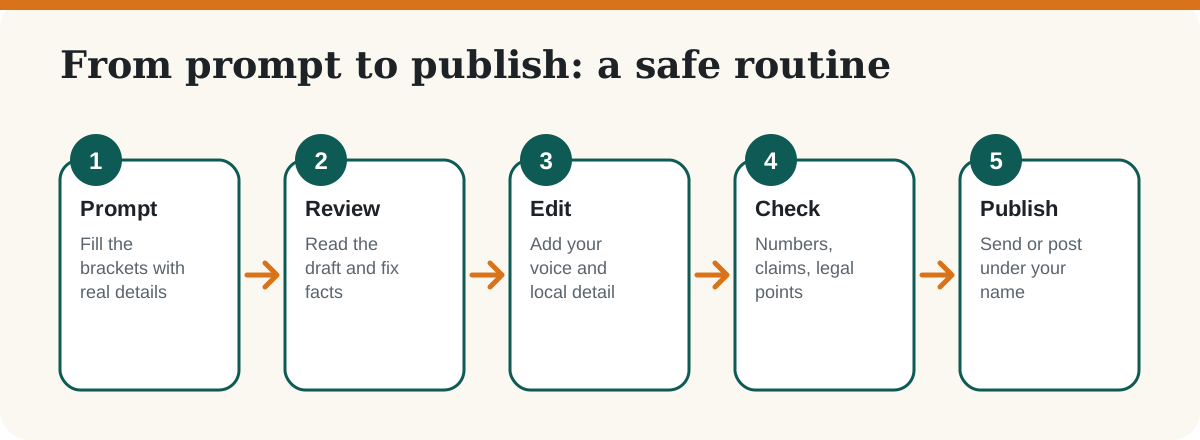
- Treat the output as a draft. Check facts, prices, dates and legal or tax points yourself.
- Do not paste customer personal data, passwords or confidential files into a chat.
How do you write a good ChatGPT prompt for your business?
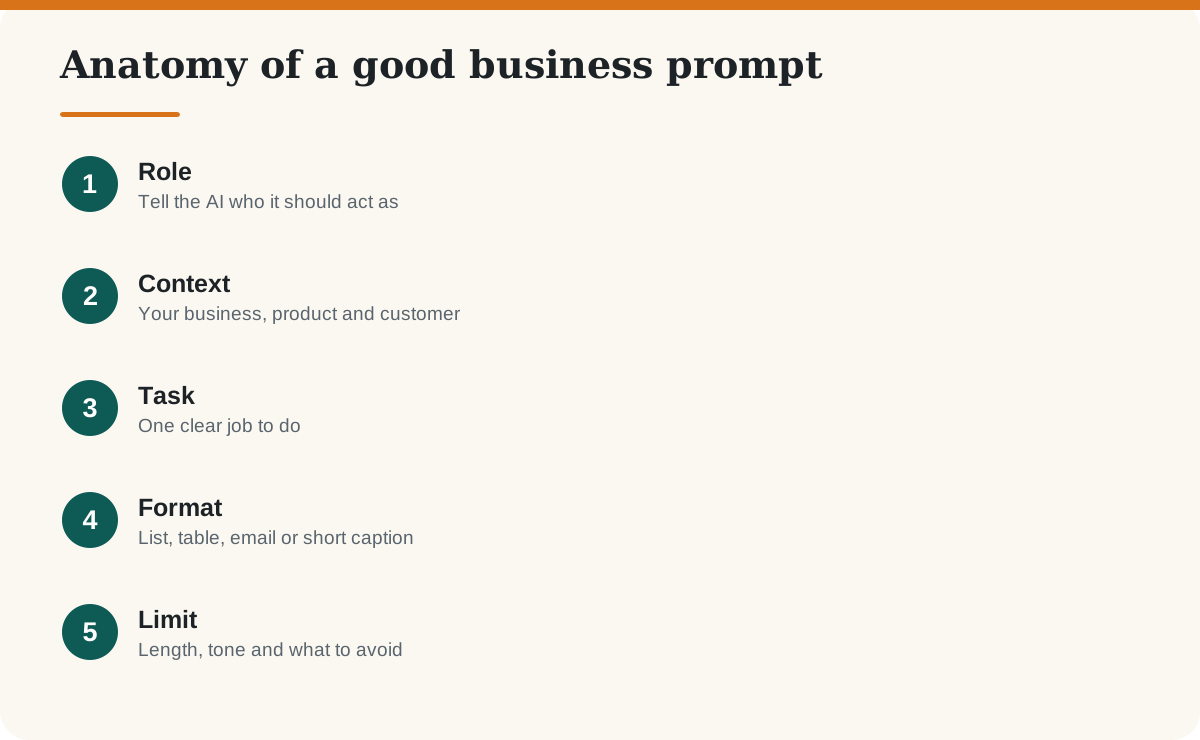
Give it five things: a role, context, a task, a format and a limit. For example: “You are a marketing assistant for a home bakery in Pune (role and context). Write three Instagram captions for our new eggless cake range (task). Use a friendly tone, under 40 words each, with two hashtags (format and limit).” The prompts below already follow this pattern. For a deeper guide, read our article on writing better AI prompts.
Which ChatGPT prompts help with marketing?
Use these to plan content, write captions and improve your offers. For more tools, see our list of AI marketing tools.
- Content calendar: “Act as a social media manager for [business type] in [city]. Create a 4-week content calendar with 3 posts a week for [platform]. Our customers are [audience]. Give each post a topic, a hook and a call to action in a table.”
- Product description: “Write a 60-word product description for [product]. Key features: [list]. Audience: [who]. Tone: warm and honest. Avoid exaggerated claims.”
- Instagram captions: “Write 5 captions for [product or offer], each under 40 words, with a different hook and 2 relevant hashtags.”
- Offer ideas: “I run [business]. Suggest 5 festival-season offers for [festival] that protect my margin of about [x]%. Explain the risk of each.”
- Blog outline: “Create an outline for a 1,200-word blog post answering ‘[customer question]’. Add H2 headings written as questions and a 5-question FAQ.”
Which prompts help you sell more?
- Cold email: “Write a short email (under 100 words) introducing [business] to a [type of buyer]. Mention one problem we solve: [problem]. End with one simple question.”
- WhatsApp follow-up: “Write a polite WhatsApp follow-up for a customer who asked for a quote 3 days ago for [service]. Keep it under 50 words and do not sound pushy.”
- Quotation cover note: “Draft a professional cover note for a quotation of [amount] for [service]. Include scope, timeline [x days] and payment terms [terms].”
- Objection handling: “List the 6 most common reasons a customer says ‘it is too expensive’ for [product]. Give a calm, honest reply for each.”
- Sales pitch: “Write a 30-second spoken pitch for [business] for a first meeting with [buyer type]. Plain words, no jargon.”
Which prompts help with customer support?
These save time on repeat questions. Keep a human in the loop for complaints and refunds. See also how ChatGPT can support customer service, marketing and sales.
- FAQ page: “Here are 10 questions customers ask us: [paste]. Write clear answers in 2 to 3 sentences each, based only on this policy: [paste policy].”
- Apology reply: “Write an empathetic reply to a customer whose order of [item] arrived late. Apologise once, explain the next step [step] and avoid making promises I cannot keep.”
- Review response: “Reply to this review in under 60 words, thanking the customer and addressing the concern calmly: [paste review text without personal details].”
- Support macros: “Create 8 reusable reply templates for common issues in [business type], such as delivery delay, refund request and wrong item. Use [Name] and [Order No.] placeholders.”
- Policy wording: “Rewrite our return policy so a customer can understand it in 30 seconds. Original: [paste]. Keep the meaning exactly the same.”
Which prompts help with daily operations and money?
- Weekly plan: “I have these tasks this week: [list] and [x] working hours. Build a day-by-day plan, putting the most important tasks first.”
- SOP writer: “Turn these rough notes into a step-by-step standard operating procedure a new employee could follow: [notes].”
- Meeting summary: “Summarise these meeting notes into decisions, action items with owners, and open questions: [notes].”
- Spreadsheet helper: “Explain how to calculate [metric] in Google Sheets or Excel from columns [A, B, C]. Give the exact formula and one example.”
- Price check: “Here are my cost and selling price for [product]: [numbers]. Calculate my margin and suggest three price points. List the assumptions you made.”
Important: ChatGPT can make arithmetic and tax mistakes. Check every number, and ask your accountant about GST, TDS or other compliance questions.
Which prompts help with hiring and planning?
- Job post: “Write a job post for a [role] at a small [business type] in [city]. Include 5 responsibilities, 5 requirements and a salary range of [range]. Keep it inclusive and honest.”
- Interview questions: “Create 8 interview questions for a [role] and what a good answer looks like for each.”
- Onboarding plan: “Create a 30-day onboarding plan for a new [role] with weekly goals.”
- SWOT: “Run a SWOT analysis for my business: [short description]. Ask me 5 clarifying questions first.”
- Goal setting: “Turn this goal into a 90-day plan with monthly milestones and weekly actions: [goal]. Flag risks.”
How do you get better answers from ChatGPT?
- Ask it to ask you questions first. Add “Ask me up to 5 questions before you answer.”
- Give an example. Paste one reply or post you like and say “match this style”.
- Iterate. Follow up with “shorter”, “more formal” or “add a local example”.
- Ask for sources or assumptions. Then verify them yourself.
- Keep a prompt library. Save the prompts that work in a document for your team.
What should you never paste into ChatGPT?
Do not paste customer phone numbers, addresses, Aadhaar or PAN details, bank information, passwords or confidential contracts. OpenAI explains that you can turn off “Improve the model for everyone” in Data controls and use Temporary Chat for sensitive tasks; business workspaces are not used for training by default. Settings can change, so check OpenAI’s current help page. We cover this in detail in our guide on whether it is safe to share business data with ChatGPT.
Frequently asked questions
Is ChatGPT free for small businesses?
ChatGPT has a free plan with usage limits and paid plans with more features. Plans and prices change, so check OpenAI’s pricing page before you decide.
Can ChatGPT replace my marketing agency?
No. It is good for first drafts, ideas and routine writing, but it does not know your customers, brand or market the way you do. Use it to speed up work, not to skip strategy and review.
Can I use ChatGPT content on my website?
Yes, but edit it, add your own experience and verify facts. Google says AI-assisted content is not banned, but content made mainly to manipulate rankings can break its spam policies.
Are these prompts only for ChatGPT?
No. They work in most AI chat tools such as Gemini and Claude, though answers differ between tools.
Can I write prompts in Hindi or Marathi?
Yes. ChatGPT understands Hindi and Marathi. Check the output carefully, because tone and grammar can need a native speaker’s edit.
Is it safe to share customer details with ChatGPT?
Avoid sharing personal or confidential data. Remove names and contact details, and review OpenAI’s data controls for your plan.
Sources
Last checked: October 2026. Plans, features and settings in AI tools change often.