How to Appear in Google AI Overviews: A 10-Step Checklist
AI Overviews are the AI-written summaries that sometimes appear above the normal results in Google Search, with links to the pages they drew from. Many agencies sell secret tricks to get into them. This guide sticks to what Google itself has published for site owners, and turns it into a practical checklist you can run on any page. Last checked: October 2026.
What Does Google Say About Appearing in AI Overviews?
Google’s documentation for site owners, AI features and your website, makes five points that matter:
- No special optimisation is required. The same SEO fundamentals that help a page in normal search apply to AI Overviews and AI Mode.
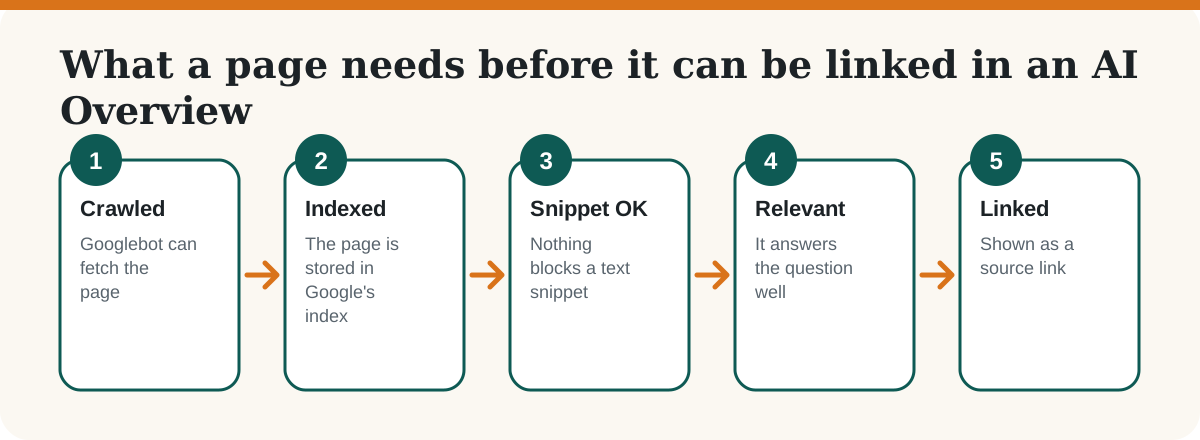
- Be indexed and eligible for a snippet. To be shown as a supporting link, a page has to be indexed and allowed to show a snippet in Google Search.
- You do not need new files or markup. Google says you do not have to create machine-readable files, AI text files or special markup to appear.
- Structured data must match the page. Any markup you use should agree with the visible text.
- Results are measured in Search Console. Traffic from AI features is included in your overall Search performance data.
Google also notes that these features can use a “query fan-out” approach: they run several related searches across subtopics and then combine what they find. In practice that rewards pages that answer a question completely, including the follow-up questions a reader would ask next.
The 10-Step Checklist for Appearing in AI Overviews
1. Check that the page is indexed
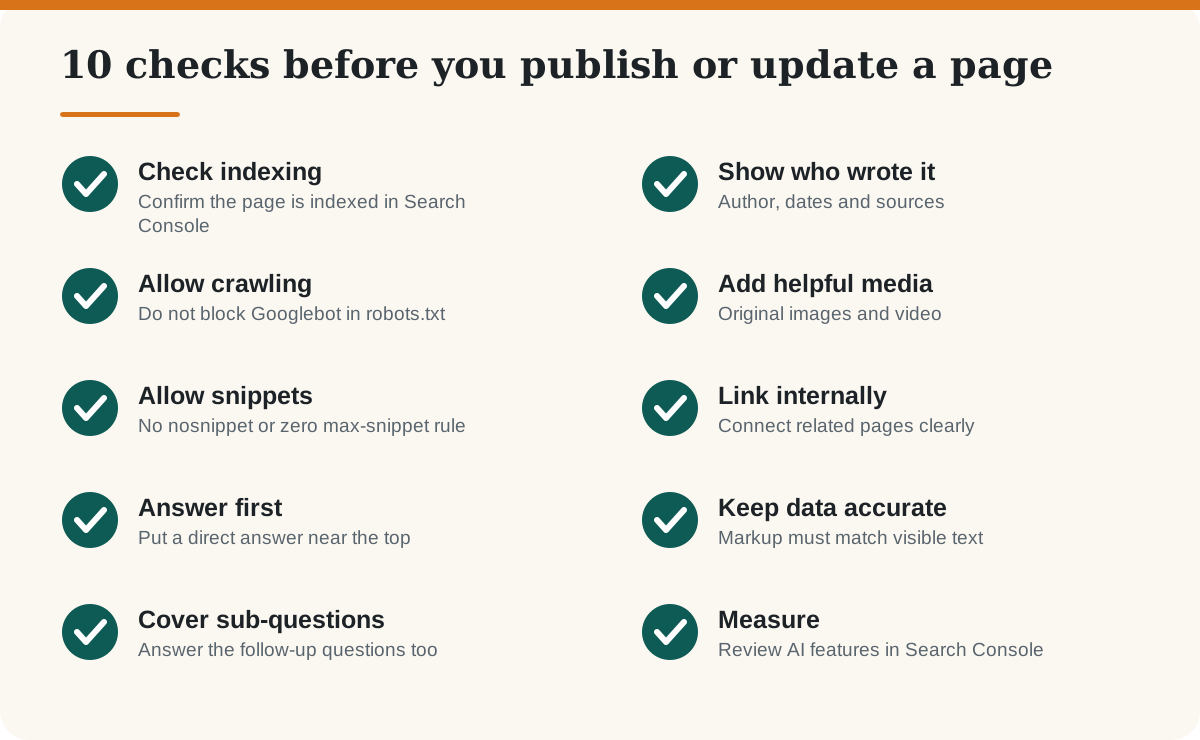
Open Google Search Console, paste the URL into the inspection bar and look for “URL is on Google”. If it is not, fix that first: nothing else on this list matters for a page Google has not indexed. See which on-page SEO elements matter most for the basics.
2. Make sure Googlebot can crawl it
Google says robots.txt rules for Googlebot are the control site owners have over how their pages are crawled for Search. Check that your robots.txt does not disallow the section you want to rank, and that important content is not hidden behind a login or only loaded by a script that fails.
3. Do not block snippets by accident
Page-level preview controls such as nosnippet or a very small max-snippet value can stop Google showing text from your page. Some SEO and security plugins add them site-wide, so check the page source once.
4. Put a direct answer near the top
Write the answer to the page’s main question in the first 40 to 60 words, then explain. Readers get what they came for, and a system that summarises pages can lift a clean, self-contained answer. This page does exactly that in the box at the top.
5. Answer the follow-up questions too
Because AI features may search several related subtopics, a page that covers the obvious next questions has more to offer. Use question-style headings and a short FAQ at the end, written from real questions you hear from customers.
6. Show who wrote it and where the facts came from
Name the author, show the published and updated dates, and link to primary sources for any figure or rule. Google’s guidance for all content is to be helpful, reliable and people-first, and visible authorship and sourcing are the simplest signs of that.
7. Support the text with original images and video
Add original photos, diagrams or screenshots that explain something, with descriptive alt text, and a relevant video where it genuinely helps. Decorative stock images add little.
8. Link related pages together
Google lists internal links as a way to make content easier to find. Link from related articles using clear anchor text, and link each article back to its section hub. For example, this guide sits alongside our guide to Google SEO, GEO and AEO.
9. Keep structured data and business details accurate
If you add schema such as Article, FAQ or Recipe, make sure it matches what is on the page. If you run a shop or a local business, keep your Merchant Center and Google Business Profile information current. Our guide to optimising a Google Business Profile shows how.
10. Measure in Search Console, not by guesswork
Traffic from AI features is counted in the Performance report along with normal Search traffic. Track impressions, clicks and the queries behind them over several weeks, and update the pages that are close to ranking.
What Does Not Help (and What to Skip)
- Special files for AI. Google says you do not need them. See our honest look at llms.txt.
- Mass-produced AI text. Pages written only to rank add little value. Read everything you need to know about AI-generated content.
- Guarantees. Nobody can promise a place in an AI Overview. Be careful with any agency that does. See how to compare GEO and AIO agencies in India.
- Keyword stuffing. It makes the page worse for readers and does not help here.
Frequently Asked Questions
-
Do I need special schema markup to appear in Google AI Overviews?
No. Google says you do not need special markup or new machine-readable files to appear. If you use structured data, it should match the visible text on the page.
Can I pay Google to appear in an AI Overview?
There is no way to pay for a place in the organic AI Overview links. Focus on pages that are indexed, helpful and clearly written.
Why is my page not shown even though it ranks well?
AI features may use different models and techniques from the normal results, so the links they show can differ from the standard ranking. Keep improving the page and measure over weeks.
Does blocking AI crawlers stop my site appearing in Google AI Overviews?
Google says AI features are built into Search, so the control for Search crawling is robots.txt for Googlebot. Blocking Googlebot also removes your pages from normal Search, so think carefully before doing it.
How do I see AI Overview traffic in Search Console?
Traffic from AI features is included in your overall Search performance data in Search Console. Review the Performance report for queries and pages that gained impressions.
Is GEO different from SEO?
GEO focuses on being cited in AI-written answers. In practice it builds on the same foundations as SEO: crawlable, helpful, well-structured pages with clear authorship.
How long does it take to see a change?
It depends on how often Google recrawls the page. After updating, request indexing in Search Console and review results over several weeks.