Google Business Profile Optimisation for Indian Local Businesses

When someone in your city searches for “dentist near me” or “sweet shop in Thane”, Google shows a map and a short list of businesses. Those listings come from Google Business Profiles, which are free. This guide covers how to set one up properly and keep it working, using Google’s own published advice. Last checked: October 2026.
How Does Google Rank Local Businesses?
Google’s help page on improving your local ranking says local results are based mainly on three things: relevance, distance and prominence. It also says plainly that there is no way to request or pay for a better local ranking.
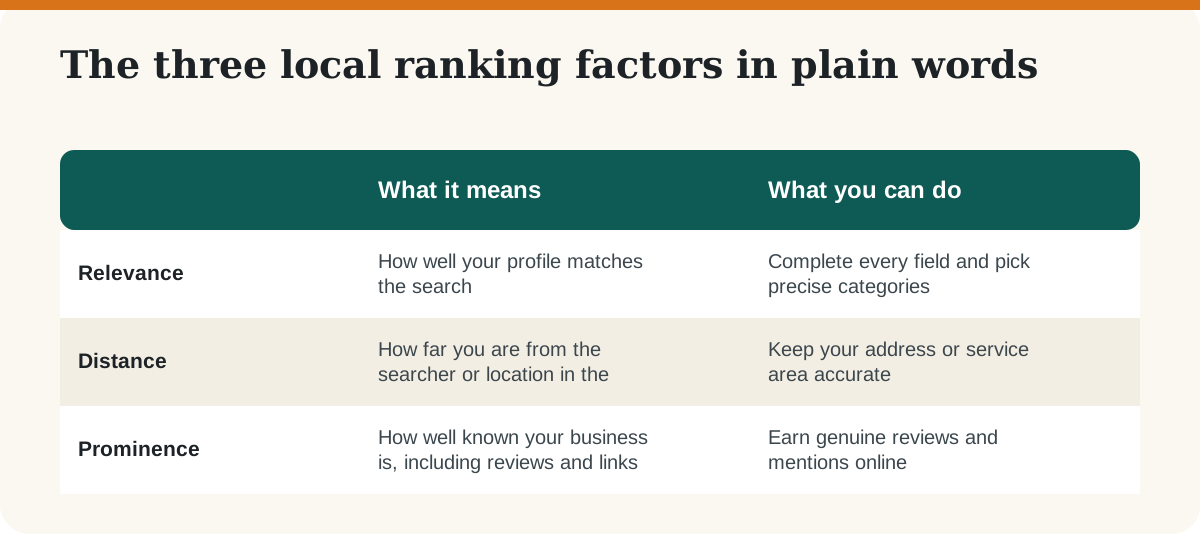
Google adds that prominence also draws on information about your business from across the web, such as links, articles and directories, and that review count and review score can affect local ranking.
How to Set Up and Optimise Your Profile: 8 Steps
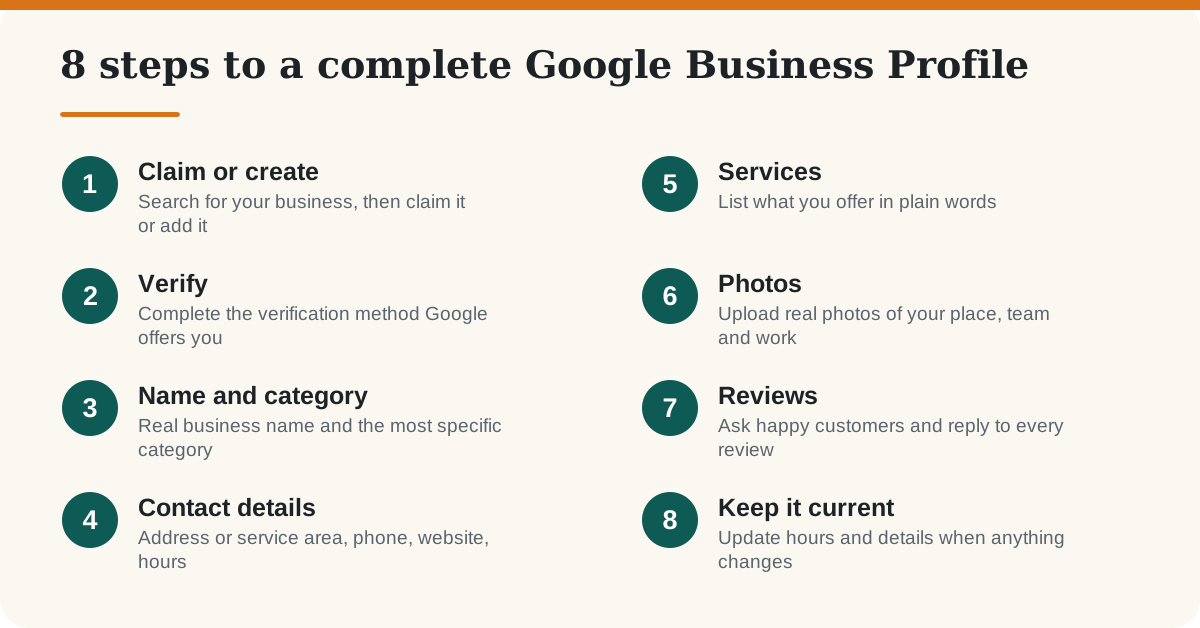
1. Claim or create your profile and verify it
Search for your business name on Google Search or Maps while signed in with the account you want to own the profile. If a listing exists, claim it; if not, add it. Google says businesses with complete and accurate information are more likely to show up in local results, and that verifying your business is part of that. The verification options depend on your business, so follow what Google offers you rather than looking for a workaround.
2. Use your real name and the most specific category
Use the name your customers see on your signboard, bill and website. Adding keywords or a location to the name can get a profile suspended. Instead, let the category do the work: choose the most specific option that fits, such as “Dental clinic” rather than just “Health”. Add other categories only if they are genuinely true.
3. Add accurate contact details and hours
Enter your full address, a phone number that is answered and your website address. If you visit customers instead of receiving them, set a service area. Keep your name, address and phone number written the same way on your website, social pages and any directories, because consistent details make it easier for Google to be sure the business is one and the same. Update opening hours for festivals and holidays.
4. Describe your services in plain words
List the services or products you actually provide, using the words customers use. Write the business description for a person, not a search engine: what you do, who you serve and what makes you different. Skip phone numbers, links and promotional claims in the description.
5. Upload real photos and videos
Google suggests using photos and videos to show customers what you offer. Add the outside of your shop (so people can find the entrance), the inside, your team, your products or finished work, and a clear logo. Real photos are more useful than stock images, and you can add new ones every few weeks.
How Do You Get More Google Reviews the Right Way?
Reviews affect both ranking and whether a customer chooses you. Google says positive reviews and helpful replies can help your business stand out, and that you can create a link customers can use to leave a review.
- Ask at the right moment. Ask right after a good experience, in person or by sending the review link on WhatsApp or SMS.
- Make it easy. Put the review link or a QR code on your bill, counter or thank-you message.
- Reply to every review. Thank people by name where you can, and reply to critical reviews calmly with facts and an offer to fix the issue.
- Never buy or fake reviews. Do not write reviews for your own business or offer rewards in return for reviews. It breaks Google’s policies and can lead to removed reviews or a suspended profile.
How Does Your Website Help Your Profile?
Your profile and website support each other. Since prominence includes links and mentions from across the web, a clear website with a page for each service and location you cover gives Google more to understand. Make sure your contact details match, add your city and area names naturally in headings, and link your profile from your site. For the website side, see our guide to on-page SEO elements, and our broader simple steps to learn SEO. Google also says that keeping your Business Profile information current is part of being eligible for its AI features, which we cover in how to appear in Google AI Overviews.
Common Mistakes to Avoid
- Keywords in the business name. It can lead to suspension.
- A broad category. Choose the most specific one that is true.
- Unanswered reviews. Replies show future customers how you treat people.
- Duplicate listings. Claim or merge the existing listing instead of creating a second one for the same place.
- Out-of-date details. Wrong hours or a closed phone number lose customers faster than any ranking gain helps.
Frequently Asked Questions
-
Is Google Business Profile free?
Yes. Creating and managing a Business Profile is free. Google says there is no way to pay for a better local ranking.
What are the three local ranking factors?
Google says local results are based mainly on relevance, distance and prominence. Relevance is how well your profile matches the search, distance is how far you are from the searcher, and prominence is how well known your business is.
Can I add keywords to my business name?
No. Use the real name your customers know. Adding keywords or locations to the name can get a profile suspended.
Do I need a shop to have a Business Profile?
Not always. Businesses that serve customers at their location, or travel to customers, can be eligible, and service-area businesses can set the areas they serve. Check Google’s current eligibility rules for your case.
Do reviews affect local ranking?
Yes. Google says review count and review score factor into local ranking, and that more reviews and positive ratings can improve it.
How often should I update my profile?
Review it at least once a month, and update it straight away when hours, services, phone numbers or your address change.